pixels
US
・UK
A1 sơ cấp
n. pl.danh từ (số nhiều)Điểm ảnh
Phụ đề video
Bên trong quá trình sản xuất chip AI | WSJ Công nghệ Đằng sau (Inside the Making of an AI Chip | WSJ Tech Behind)

- So to create a brand new image of a cat, it would only produce a couple pixels at a time.
- [Người dẫn chuyện] Ron Diamant là kiến trúc sư trưởng
- But an AI chip has more cores that run in parallel, so it can process hundreds or even thousands of those cat pixels all at once.
của Inferentia và Trainium, các chip AI tùy chỉnh của công ty.
Hướng dẫn Photoshop - SỬA LỖI NHIỄU MÀU trong ảnh (Photoshop Tutorial - FIXING color casts in images)
- If you want your sample size to be bigger, then you can set it to something like 11 by 11 average if you want, which means 11 pixels wide by 11 pixels tall.
Nói cách khác, tôi chỉ đang lấy điểm dưới con trỏ của mình.
- If you want your sample size to be bigger, then you can set it to something like 11 by 11 average if you want, which means 11 pixels wide by 11 pixels tall.
Nếu bạn muốn kích thước mẫu lớn hơn, bạn có thể đặt nó thành thứ gì đó như trung bình 11x11 nếu muốn, nghĩa là rộng 11 pixel và cao 11 pixel.
Tại sao AI vẽ tay lại gặp khó khăn (Why AI art struggles with hands)

- So these patterns in pixels are easy to understand.
nhưng các quy trình khác nhau.
- So it is just trying to guess where hand-like pixels should be, without knowing how hands work, like we do.
Và đó là lúc nó trở nên rất khác so với cách AI đang học.
Tom Cruise cuối cùng cũng được Oscar PART2 | Tom Cruise không chỉ đóng phim, anh ấy là phim! Đạo diễn "Birdman" nói quá hay, nghe xong chảy nước mắt | 【爆米花看電影】25-11-17 (#阿湯哥 終於得到奧斯卡PART2|阿湯哥不只是拍電影,他就是電影!《#鳥人》導演太會講,聽著聽著就哭了|【爆米花看電影】25-11-17)

- He has resisted being swallowed by brands, social media, streaming, pixels, and endless soulless exposure.
Trong suốt sự nghiệp của mình, Tom đã làm việc với những người thực hành.
- He has resist being swallowed by brands, social media, streaming pixels and endless soulless exposure.
Anh ấy đã chống lại việc bị nuốt chửng bởi các thương hiệu, mạng xã hội, các pixel streaming và sự phơi bày vô hồn không ngừng.
Những cách lành mạnh để khám phá tình dục mà không cần xem phim người lớn (Healthy Ways to Explore Your Sexuality Without Porn)

- Every time you choose presence over pixels, you're teaching your brain to respond to real people.
Mỗi lần bạn chọn sự hiện diện thay vì màn hình, bạn đang dạy não bộ của mình phản ứng với con người thật.
- Every time you choose presence over pixels, you're teaching your brain to respond to real people.
Một buổi tắm rửa chậm rãi, vài hơi thở sâu, một cái chạm nhẹ nhàng để cảm nhận sự hiện diện, không phải để kích thích, hoặc thậm chí ghi chép lại những điều khiến bạn cảm thấy an toàn và được yêu thương.
Hướng dẫn Auto Layout Figma cho người mới bắt đầu (2025) (Figma Auto Layout Tutorial for Beginners (2025))
- This arranges your elements vertically The third one is Horizontal It arranges your elements horizontally The fourth one is Grid This is a new update still in beta It allows you to edit the layout in a grid format We'll go over each of these in detail Don't worry, by the end of this video, you'll understand how to use every single button here Let us start with the Freeform setting You'll see W and H right below this button W stands for Width and H stands for Height You can use these fields to adjust the size of your element You can type in a number, hover over the letter and drag to change it Or do it the most organic way Hover over the edge of the element and drag until you see a number you like I like multiples of 4 To the right, you'll see a square icon If you click it, it locks the aspect ratio of the element So the width and height stay proportional Let's say you are redesigning a YouTube thumbnail A YouTube thumbnail has a specific aspect ratio So locking it can prevent your cat, your kid, and mostly you from messing it up One very, very important thing Make sure you select the right layer In a real design project, you'll have so many layers So if you want to lock the aspect ratio of this circle, let's say Make sure to select the circle, not the frame That way, your circle will stay perfectly as a circle Not too fat, not too short Below Width, you'll find a field to adjust the gap between elements This only appears in freeform mode when your elements share the same gap At the bottom, you'll see the clip content checkbox This is super helpful when your frame is smaller than the elements inside For example, in a carousel design Checking clip content will hide the parts of the elements that extend outside the frame Alright, next let's move on to vertical and horizontal layouts These two are really similar So let's take a look at the horizontal one When you select a horizontal layout A wrap icon will appear on the right If you click it, the elements inside the frame will automatically wrap into multiple rows Perfect for when there's not enough space in a single line Below that, you'll see width and height settings Each with a drop-down If you click the drop-down, you can set the size to hug This makes the frame automatically adjust to fit its contents For example, if you add a new circle to the frame The width will automatically expand to hug the new element You can also set minimum or maximum values for width and height Let's say you don't want the frame to be wider than 750 pixels Just set the max width to 750 And even if you add more elements, the frame won't go beyond that limit Right below width, you'll see nine alignment options for your elements inside the frame These let you align your content to the top, center, bottom, left, right Basically any corner or edge you want You might not notice much difference right now if your frame is hugging the elements But once the frame is bigger, this alignment will become very obvious Next is the gap setting Click the drop-down and you'll see an option to set it to auto This automatically adjusts the space between elements to fill the frame evenly So satisfying to see everything snap into place Below that are your padding settings Padding is the space between the edge of the frame and the element inside it By default, padding is applied equally on parallel sides But if you click the little toggle next to it, you can customize the padding for each side Just like this Next, let's move to grid A brand new and still in beta feature in Figma Alright, I have a love-hate relationship with this, okay?
Điều này sắp xếp các yếu tố của bạn theo chiều dọc. Tùy chọn thứ ba là Horizontal. Nó sắp xếp các yếu tố của bạn theo chiều ngang. Tùy chọn thứ tư là Grid. Đây là bản cập nhật mới vẫn đang ở giai đoạn beta. Nó cho phép bạn chỉnh sửa bố cục theo định dạng
- Let's say you don't want the frame to be wider than 750 pixels.
Nhưng hình ảnh và video AI thực sự hoạt động như thế nào? | Video khách mời của Welch Labs (But how do AI images and videos actually work? | Guest video by Welch Labs)
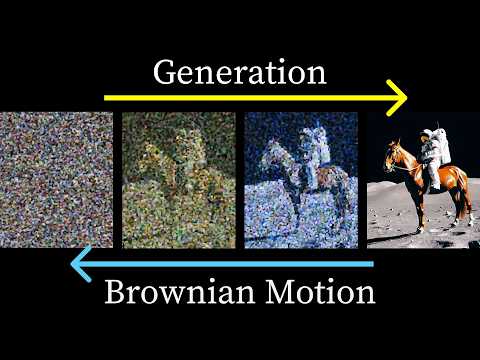
- If we reduce the size of our images to only two pixels, we can visualize the distribution of our images by plotting the pixel intensity value of our first pixel on the x-axis of our scatterplot, and the pixel intensity of our second pixel on the y-axis.
Nếu chúng ta giảm kích thước hình ảnh của mình xuống còn hai pixel, chúng ta có thể hiển thị phân bố của hình ảnh bằng cách vẽ giá trị cường độ pixel của pixel đầu tiên trên trục hoành của biểu đồ phân tán, và giá trị cường độ pixel của pixel thứ hai trên
- If we reduce the size of our images to only two pixels, we can visualize the distribution of our images by plotting the pixel intensity value of our first pixel on the x-axis of a scatter plot and the pixel intensity of our second pixel on the y-axis.
Nếu có đủ điểm huấn luyện, chúng ta kỳ vọng sẽ có nhiều đường dẫn khuếch tán đi qua khu vực này, và trung bình các điểm của chúng ta sẽ khuếch tán ra xa khỏi đường xoắn ốc ban đầu, do đó mô hình của chúng ta có thể học cách chỉ về phía đường xoắn ốc ban đ
Crimson Desert (console) - Trước khi bạn mua (Crimson Desert (console) - Before You Buy)

- The blocks of pixels covering the scenery like they tend to flicker.
Các khối pixel bao phủ cảnh vật như thể chúng có xu hướng nhấp nháy.
- The blocks of pixels covering the scenery, like, they tend to flicker.
Các khối pixel bao phủ cảnh vật như thể chúng có xu hướng nhấp nháy.
Đánh giá Samsung Galaxy S26 Ultra: Có một điểm trừ (Samsung Galaxy S26 Ultra Review: There's a Catch)
- But also, because it's built into the display, you can turn it on for just the pixels you want to when you want to, so maybe only in certain apps.
Giờ thì, đúng là bạn luôn có thể mua một miếng dán màn hình rẻ tiền khoảng 20, 30 đô la như cái này để làm điều đó thông qua phân cực.
- But also because it's built into the display, you can turn it on for just the pixels you want to when you want to.
Nhưng cũng vì nó được tích hợp vào màn hình, bạn có thể bật nó cho những pixel bạn muốn khi bạn muốn.
Tại sao chứng minh bạn không phải robot lại khó hơn bao giờ hết | WSJ Công nghệ đằng sau (Why Proving You Aren’t a Robot Has Never Been Harder | WSJ Tech Behind)
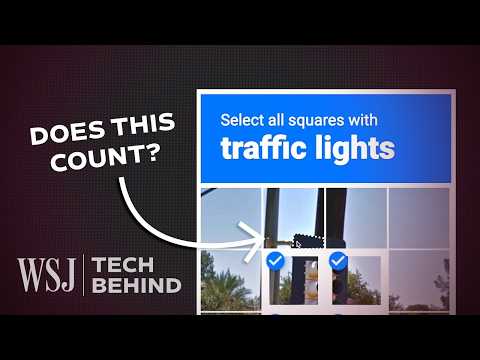
- Whereas you and I would process the stream of perceptual input, the computer vision system is basically taking the pixels and processes strings of pixels – vectorised, we would say – and as it processes these images, it's picking up patterns in the images, it's picking up patterns in the pixels.
Trong khi bạn và tôi xử lý luồng thông tin cảm giác, hệ thống thị giác máy tính cơ bản là lấy các pixel và xử lý chuỗi pixel – được vectơ hóa, như chúng ta thường nói – và trong quá trình xử lý các hình ảnh này, nó nhận diện các mẫu trong hình ảnh, nhận d
- Whereas you and I would process the stream of perceptual input, the computer vision system is basically taking the pixels and processes strings of pixels, vectorized, we would say.
Nó đang được huấn luyện để nhận diện xe ô tô bằng cách sử dụng rất nhiều, rất nhiều, rất nhiều hình ảnh của xe ô tô.